Tasks & Calendar
Organize tasks and special dates so nothing important slips by.
Sign up for early accessWhat is it for?
Bills, appointments and household jobs: your shared to-do list shows what is waiting and who will take care of it.
Assign a task to yourself, your partner or both of you.
1. Add a task
Quick add:
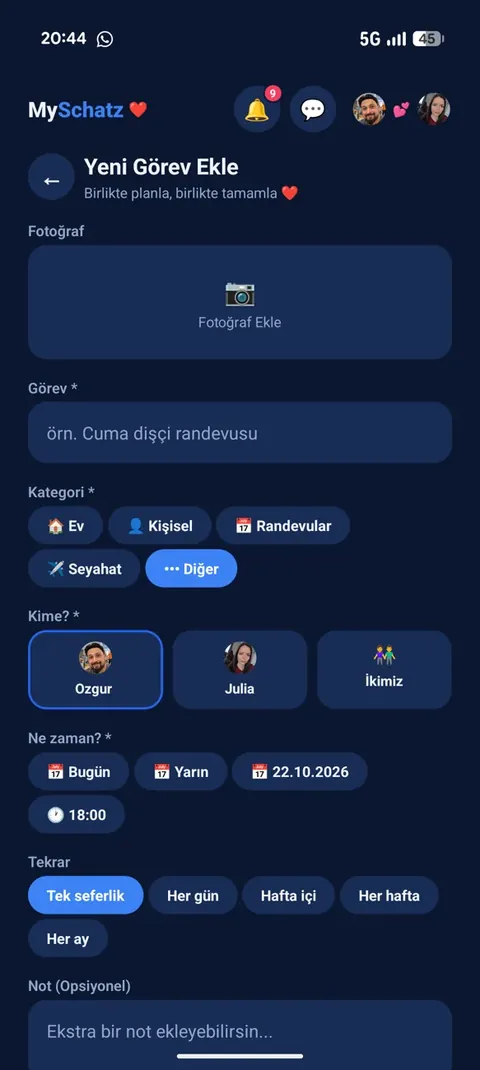
Choose Home, Personal, Appointments, Travel or Other. Type the task into the field and send it.
Add with details:
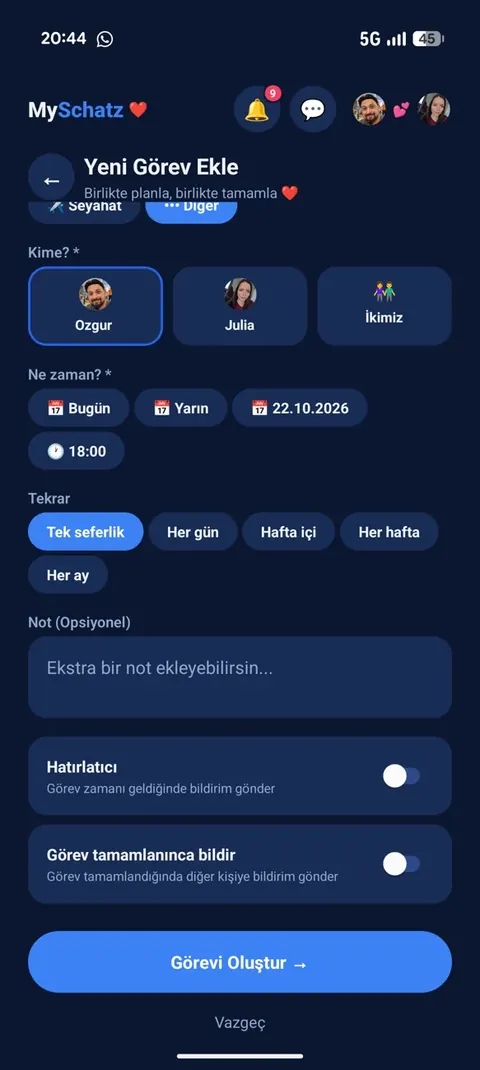
- Who? Yourself, your partner or both.
- When? Today, tomorrow or your own date and time.
- Repeat: once, daily, weekdays, weekly or monthly.
- Note and photo: for example, the spare part you need or an appointment card.
- Reminder: a notification when the task is due.
- Notify on completion: let the other person know when it is done.
2. Assign a task to your partner
Your partner receives a notification and a small note appears in your chat.
The task immediately enters their list. If a reminder is enabled, their phone reminds them at the scheduled time.
3. Complete a task
Tap its checkbox or open it and mark it complete.
It moves to Completed, showing who finished it.
If completion notifications are enabled, your partner receives a notification and a chat note. A little thank-you is always welcome! 💕
For recurring tasks, the next occurrence is prepared automatically. It stays out of the list until its day arrives.
4. Keep things organised
Tasks are grouped into Today, Upcoming, Later and Completed.
Overdue tasks have a red label. Filter by category, edit or delete tasks, or return completed tasks to the active list.
Real app screenshots
Hold an image to enlarge it. Release to close.