Weekly Plan
Plan your week with partner views and shared notes.
Sign up for early accessWhat is it for?
Bring your schedules into one calendar. See who is doing what and find time together without overlooking important dates.
1. View your calendar
Choose a weekly, two-week, monthly or yearly view.
Tap a day to see its plans. Colours distinguish food, appointments, sport, health and other categories.
2. Add an event
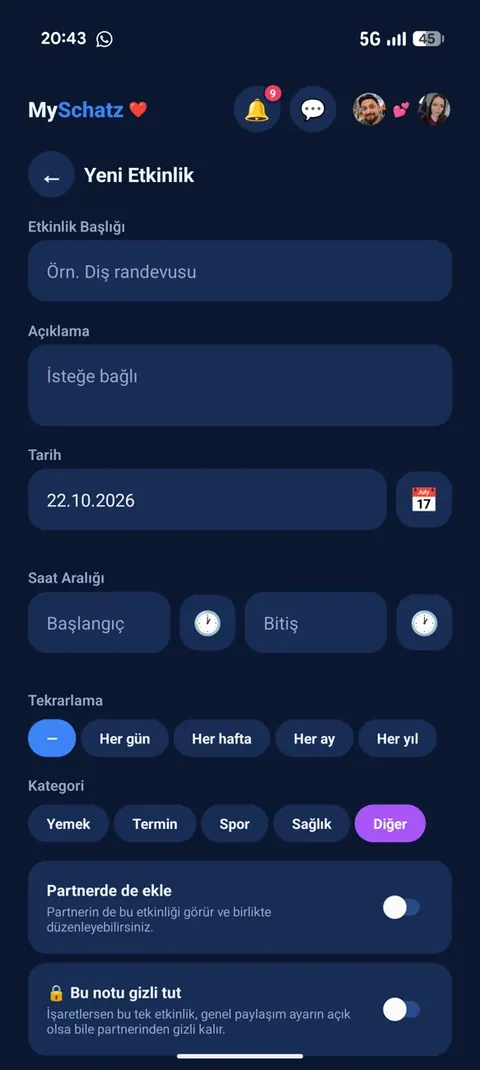
Enter a title, date, start time and end time.
Optional extras:
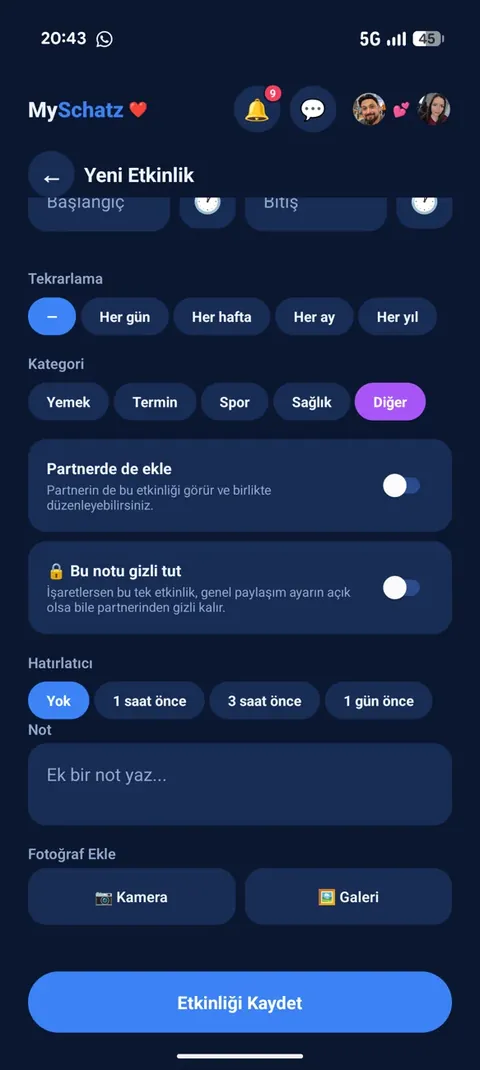
- daily, weekly, monthly or yearly repetition,
- a reminder 1 hour, 3 hours or 1 day beforehand,
- a description, note and photo, such as an invitation.
Plans can also come from chat: when the app recognises an appointment, a card asks whether to add it to the calendar.
3. Choose who sees it 🔒
Each event has three options:
- Normal: Your partner sees your event but cannot edit it.
- Add for my partner too: It becomes a shared plan both can edit, and your partner is notified.
- Keep private: Only you see it – perfect for a surprise.
You can turn calendar sharing off altogether. New events are then private by default, while individual events can still be shared.
Reminders are personal. They ring only on the phone of the person who created them, even if the other partner edits a shared event.
4. Connect with your phone calendar
Import selected existing appointments from your phone calendar.
Export Weekly Plan events to your phone calendar so they appear there too.
Important: import and export make a one-time copy. Later edits do not automatically sync between the two calendars.
Real app screenshots
Hold an image to enlarge it. Release to close.